
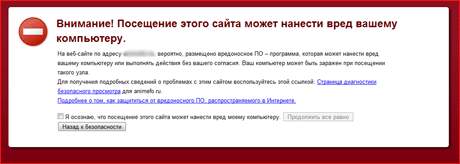
Almost every webmaster has faced a situation where their site was hacked and viruses were inserted into the source code. It doesn't matter whether they were added through includes or JavaScript.
As far as I remember, my sites were hacked about 10 times in total. Of course, things weren't as bad back then as they are now—or maybe I was just lucky. Usually, the code was inserted into one file, [index] or [main], and it was easy to find, even with a browser.
The situation has changed. Now the virus gets into all the site's main files, such as [index], [main], [header], [menu], [admin]... And finding all these files on FTP, especially when it's a CMS with a large number of modules, can take an entire day.
Since I have many sites, removing viruses used to take a long time. Then I came up with a faster solution. Windows itself, in any version, can help you with this.
And this can be done with...
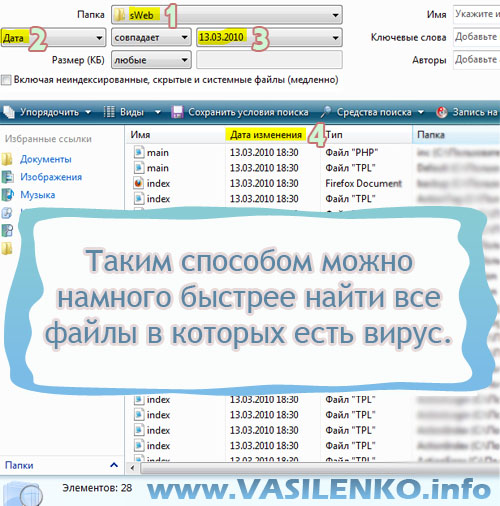
...a simple file search. Every version of WINDOWS has advanced search.
promoTools instead of manual workForty-four generators, converters, and checkers—all running in your browser.View allFirst, download all the site files from FTP to your computer.
Next, configure the search to find infected files.
1. Select the folder containing your site, the one you downloaded from FTP.
2. Every file has a last modified date. Since If files are infected not by a person, but by a script/program, the modification date will be the same for all files, differing by only a couple of minutes.
In other words, the files are infected completely automatically.
Select the second search option "Date". (See the screenshot above.)
3. Specify the file's modification date.
4. Click "Search" to see all the infected files.
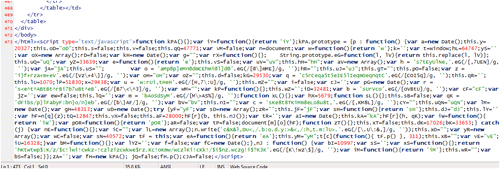
This is what the virus looks like in every file I found using these parameters. The script is located after the "\/html" tag.
You can remove it using the same Notepad. Do this for every file you found through the search, then upload all the modified files to FTP again.
I came up with this method yesterday. There may be better ways to find all infected files, but I couldn't find anything online.
Thanks for your attention!

Comments (5)
The discussion was moved with the post: the dates and authors are the same as before. New comments aren't accepted on archived posts.
Валентин
Хорошо что хоть Яндекс сейчас информирует и вирусах на сайте.
А так твой способ экономит очень много времени 🙂
КОгда делаешь много раз одно и тоже, со временем додумываешься как это сделать быстрее.
ushi
Я нашел спсоб, как найти вирус на сайте. Достаточно иметь при себе тотал коммандер и чуточку терпения:)
Мою статью «Как найти и удалить вирус с сайта wordpress. Антивирус wordpress» можно прочесть здесь: blogalt.ru/wordpress/antiviruswordpress.html
Alex
Горазо быстрее это делается с помощью bash команд, если сервер на unix-системе.
См. в сторону sed — с ее помощью меняешь зараженную строку на исходную во всех файлах сразу.
Елена
А если у меня на сайте в какой-то день были обновления или статью публиковала, то тоже же возможно наличие большого количества файлов с одинаковой датой изменения. Как тогда определить, какие файлы вирусные, а какие — нет? Их то около 200 набралось…
И ещё: я знаю, на какой странице сайта вордпресс есть вредоносный код, как мне эту страницу найти через фтп клиент, чтобы отредактировать?
Alex V author
Если вы добавили 200 статей, то они создаются в базе данных, а не в папке на FTP.
Ну я лично знаю структуру движка и могу так найти, а вам советую либо скачать весь сайт и найти через поиск.